

The capabilities of Port 2 of the DL06, DL250-1 and DL260 CPUs are often overlooked when designing a process control network. Like Port 1, Port 2 can be used for programming the CPU or connecting other RS-232 devices, such as an operator interface panel, to the PLC. Unlike Port 1, Port 2 supports different types of network interfaces and protocols and has more flexible communications. While Port 1 is limited to 9600 baud, odd parity, and RS-232 serial communications, Port 2 supports RS232C, RS422/485 4-wire, and RS-485 2-wire (DL06 and DL260 only) networks. It supports a variety of protocols: K-Sequence, DirectNET, MODBUS RTU, Non-Sequence (ASCII IN/OUT) and Remote I/O on the DL205 CPUs. The baud rate can be set from 300-38.4K baud. Parity checking and stop bits are user selectable.
With this flexibility, common uses for Port 2 include PLC to PLC communications, operator interfaces, bar code readers/printers, load-cells, serial radio and telephone modems and DirectLOGIC Remote I/O.
In order to fully understand the capabilities of Port 2, let’s take a look at the advantages of the different network interfaces and protocols.
Network Interfaces
In the following, each of the three networking options available on Port 2 will be discussed. Additional information can be found on the Technical Support page at
www.automationdirect.com.
RS-232C
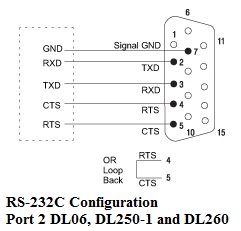
RS-232C is a simple way to connect two devices that are less than 45 feet apart, such as connecting a host computer or an operator interface to a DirectLOGIC CPU.
RS-232C Configuration
RS-232C is capable of operating at data rates up to 38.4 Kbps. The data rate may need to be reduced depending on the type and length of cable. RS-232C is a single ended interface, meaning that a single electrical signal is compared to a common signal (ground) to determine the binary logic states. As a result, RS-232C is fairly susceptible to electrical noise.
RS-422/485 4-wire
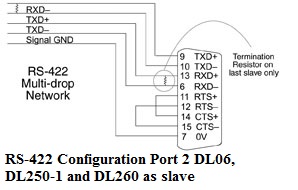
RS-422/485 4-wire is a differential interface, which means that logic levels are defined by the difference in voltage between a pair of wires, like TXD+ and TXD-, instead of a single signal wire to ground. The advantage of a differential interface is that it is typically more immune to noise or voltage spikes that may occur on the communication lines. It also has greater drive capabilities that allow for longer cable lengths.
RS-422/485 is rated for a maximum cable length of 4000 feet, and with the DirectLOGIC PLCs, a maximum data rate of 38.4 Kbps. Again, the data rate is highly dependent upon the cable type and length. AutomationDirect recommends using a Belden 9729 or equivalent cable.
The advantage of a 4-wire network is that it uses a separate pair of wires for transmit and receive signals. As a result, timing issues associated with 2-wire networks are eliminated.
RS-485 2-wire
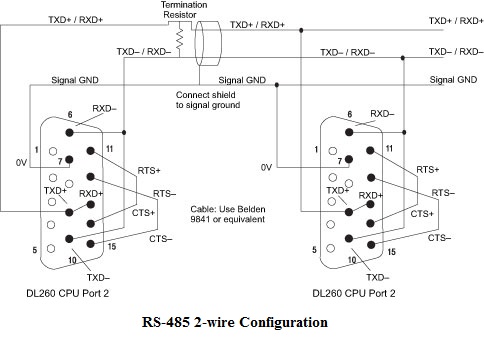
RS-485 2-wire is available on the DL06 and DL260 CPUs (MODBUS RTU only). Like RS-422/485 4-wire, RS485 2-wire is a differential interface and is rated for a maximum cable length of 4000 feet and data rate of 38.4 Kbps. Since it is a 2-wire network, the transmit and receive signals are exchanged on the same pair of wires. As a result, protocol timing can be difficult with some devices.
To determine which type of serial network to use, consider these factors: How many devices will be on the network? What is the maximum distance? What are the requirements of the other devices on the network? Are you comfortable with handling timing issues that may arise with a 2-wire multi-drop network?
Protocols
All of the protocols available have a maximum data rate of 38.4 Kbps. These protocols support half duplex communications with DirectLOGIC PLCs.
K-Sequence
K-Sequence protocol can be used with RS-232C or RS-422 networks. K-Sequence is typically used to communicate to a DirectLOGIC PLC from a host computer running DirectSoft. It may also be used to communicate between an operator interface acting as the master to a PLC network. When using K-sequence with DirectLOGIC PLCs, the PLCs cannot be the master.
One advantage that K-Sequence has is its ability to perform write operations on individual bits such as I/O points or control relays.
DirectNET
Like K-sequence, DirectNET protocol can be used with RS-232C or RS-422 networks.DirectNET is an open protocol. You can learn the specifics of DirectNET in the user manual, DA-DNET-M, which can be found at www.automationdirect.com.
DirectNET is an easy-to-use protocol when used with the DirectLOGIC family of products. It is suitable for those applications requiring data to be shared between PLCs or between PLCs and a host computer. A network utilizing the DirectNET protocol requires one master station that issues commands to transfer data between the master and slave. Examples of master stations are operator interfaces, host computers or even another PLC.
The advantage of DirectNET is that a DirectLOGIC PLC can be the master station.DirectNET is available on a number of DirectLOGIC PLCs where other protocols may not be available. One disadvantage is that data manipulation cannot occur at the bit level. Also, DirectNET is not an industry-standard protocol.
MODBUS RTU
When using DirectLOGIC PLCs, MODBUS RTU protocol can be used with RS-232C, RS-422/485 4-wire or RS-485 2-wire networks.
The are numerous advantages to using MODBUS RTU. First, it is well known and widely used in all industries. Because of its simple way of transferring data, it is up to three times faster than DirectNET. It also utilizes CRC error checking, making it more robust than DirectNET, which uses LRC error checking.
Master PLCs
There can only be one master on a network with DirectLOGIC PLCs. For example, a DL06 cannot be the master on a network along with an EZTouch panel on the same network, because the EZTouch panel must be the master. One solution to this, if it is desired to keep Port 1 free, is to connect the EZTouch panel to the PLC though a DCM option module or by using available Ethernet options.
Non-Sequence
Non-sequence (a non-structured protocol) allows the CPU to use Port 2 to either read or write raw ASCII strings using the ASCII (DL06 and DL260 only) and PRINT instructions. It can be used with RS-232C, RS-422 or RS-485 networks. (Note: there is no provision for multiple stations with the Non-sequence protocol).
Remote I/O
DirectLOGIC Remote I/O is not just a protocol, but also a network specification. Remote I/O is used to communicate with remote I/O racks up to 1000 meters away. Using Remote I/O allows the placement of sensors and other field devices a long distance from the CPU. The built-in Remote I/O master channel has the same capabilities as the RM-Net Remote I/O master module. It can be used with DirectLOGIC Remote I/O Slaves such as the T1K-RSSS, D2-RSSS and D4-RS. (The user might also consider an Ethernet solution of ERMs and EBCs as a more efficient approach when remote I/O is needed.)
In part 2 of this series, we’ll be looking at how to set up Port 2 using the DirectSoft PLC programming software.
By Robert Thornton
Product Engineer,
AutomationDirect
Originally Published: Dec. 1, 2005